


IGram

Download Instagram Reels, Stories, Video, Photo & IGTV Online

How to Download Videos and Photos from Instagram Using iGram?

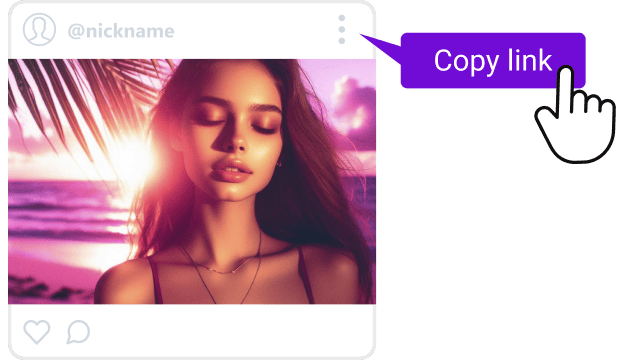
Copy the Instagram URL
1

Copy the Instagram URL

To begin open the Instagrams app or website and navigate to the post you want to download. Tap the three dot menu located at the top of the posts. A small list of options will appear including “Copy Link.” Select this option to copy the direct URL of the photo video Reel or Story. The link will be saved to your devices clipboard ready to be used on iGram.

Paste the URL into iGram
2

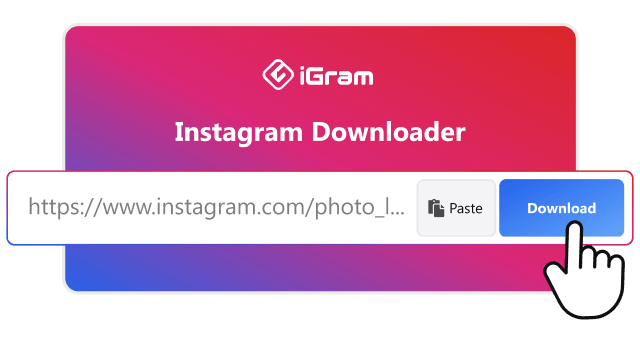
Paste the URL Into the iGram Input Box

Once the link is copied open the iGram website in your browser. At the top of the homepage you will see a simple input fields. Tap the box then paste the link you copied from Instagram. iGram will instantly detect the content and begin processing it. This step require no login or additional software which keeps everything quick and hassle free.

Download the content
3

Download the Video or Photo Instantly

After the link has been processed iGram will display download options based on the type of content you provided. If it is a video or a Reel you will see quality options such as standard or HD resolution. If it is an image you will get the highest available photo quality. Simply selects your preferred options and tap the download button. The file will begin saving to your device immediately ready for offline viewing or safe storage.

Download High Quality Instagram Videos and Photos in a Few Simple Steps Using iGram

Downloading high quality Instagram content is simple and fast with iGram. The tool automatically detects the best available resolution from the link you provide ensuring that photos stay sharp and videos remain clear. You do not need any software or login just paste the URL and let iGram process it. Within seconds you can save HD images or videos directly to your device without losing original quality.

Powerful iGram Instagram Downloader Tools and Features for Saving All Types of Media

iGram offers a complete collection of downloading tools designed to save every type of Instagram content in the highest quality possible. Whether you want photos, videos, stories, Reels, IGTV clips or entire carousel posts, the platform handles it all smoothly. Each feature is optimized to maintain sharp resolution, fast processing speed and ease of use. With this all-in-one downloader users never feel limited by format or file type.

Photo Downloader

iGram Photo Downloader

The iGram Photo Downloader lets you save Instagram images in crystal clear resolution without losing any detail. It is perfect for users who want to store aesthetic photos, inspirational images or personal memories directly to their device. The tool ensures every photo remains vibrant and sharp exactly as it appears on Instagram making it ideal for personal collections, edits or offline viewing.

Story Downloader

iGram Story Downloader

The iGram Story Downloader allows you to save public Instagram Stories instantly with no login required. If you come across a Story you want to keep, whether for inspiration, content ideas or personal reference, iGram processes it within seconds. The tool maintains the original quality of the Story while offering a safe browser-based experience without compromising privacy.

Video Downloader

iGram Video Downloader

The iGram Video Downloader makes it easy to save Instagram videos in high quality with stable performance. Whether it is a short clip or a longer video, iGram quickly extracts the best available resolution and prepares it for download. It works smoothly on all devices and ensures your saved videos look clean and professional making offline viewing effortless.

Reels Downloader

iGram Reels Downloader

Short engaging Instagram Reels can be downloaded instantly using the iGram Reels Downloader. The platform delivers HD output keeping the motion, sound and clarity intact. This tool is ideal for content creators, editors or users who want to enjoy Reels offline without buffering. It works quickly and does not require any login or additional apps.

IGTV Downloader

iGram IGTV Downloader

The iGram IGTV Downloader is perfect for saving long IGTV videos in excellent quality. IGTV content often includes tutorials, interviews or entertainment clips and iGram ensures they are downloaded smoothly without reducing clarity. Users can easily store long form Instagram videos for later viewing, professional use or research purposes.

Carousel Downloader

iGram Carousel Downloader

Instagram carousel posts often contain multiple photos or videos and iGram makes it simple to download everything at once. Instead of saving each item separately, the Carousel Downloader processes the entire post and prepares all media for download. This feature is ideal for users who want complete posts in one quick session while keeping quality intact.

Download Every Type of Instagram Content With Ease—Videos, Photos, Reels, Stories, IGTV & More

Saving Instagram content becomes effortless when using iGram. The platform is designed to work smoothly on all devices and browsers allowing you to download photos, videos, Reels, Stories, IGTV clips and more without any complications. Its processing system quickly handles links even on slower connections ensuring every file downloads in the highest clarity available. With a simple interface and reliable performance iGram makes downloading Instagram media easy for beginners and everyday users alike.

Mobile app

Download Instagram Content on Mobile with the iGram App

Experience fast one-tap downloading with the iGram mobile app. Designed with a smooth and user friendly interface, the app lets you save Instagram photos, videos, Stories, Reels and IGTV content directly to your phone in high quality. Everything is processed quickly, making it perfect for users who want to download content while on the go without any complicated steps or extra tools.

Install Now

Frequently Asked Questions (FAQ)

Here are answers to the most common questions about using iGram. If your question isn’t listed, feel free to reach out to our support team anytime.